When WordPress .htaccess not working suddenly becomes a problem, most people start checking rewrite rules, redirect syntax, or WordPress plugins. That was exactly where I spent my time first.
The strange part was that every redirect rule looked correct. IP redirects did not work, non-www redirects were ignored, and custom rewrite rules seemed completely invisible to the server. No errors appeared in WordPress, and LiteSpeed Cache was not involved. The behavior made it look like the rewrite rules were wrong, but the issue turned out to be somewhere else entirely.
This happened on a Bitnami WordPress installation running on AWS Lightsail. The site itself worked normally, but Apache was simply refusing to read the .htaccess file. Once I found the cause, the fix took only a few minutes.
Table of Contents
Environment Summary
This setup was tested on:
- AWS Lightsail
- Bitnami WordPress
- Apache web server
- HTTPS-enabled WordPress installation
- Custom domain with redirect rules
Symptoms included:
- Redirects ignored
- IP address access still available
- WWW and non-WWW versions loading simultaneously
- Rewrite rules having no effect
- URL consolidation failing
The root cause behind this WordPress .htaccess not working issue was not WordPress itself. It was Apache configuration.
Why WordPress .htaccess Not Working Happens on Bitnami
Many Bitnami installations use Apache settings that prevent .htaccess files from being processed.
In that state, WordPress behaves normally, but every rule inside .htaccess becomes useless. Redirects, security rules, caching directives, and custom rewrites are all ignored.
The result is often confusing because the configuration appears correct while nothing actually changes.
Common signs include:
- IP address redirects fail
- Canonical URL cleanup doesn’t work
- WWW redirects are ignored
- Security rules never trigger
- Rewrite-based plugins appear broken
For anyone troubleshooting WordPress .htaccess not working, checking Apache’s AllowOverride value should be one of the first steps.
Connecting to the Server
The first step was opening the Lightsail instance and connecting through the browser-based SSH terminal.

Once connected, I could inspect the Apache virtual host configuration directly rather than spending more time testing rewrite rules.
Opening the Virtual Host Configuration
The next step was locating the Apache configuration file responsible for the WordPress site.
I opened the virtual host file using Nano and checked how Apache was handling directory permissions and overrides.
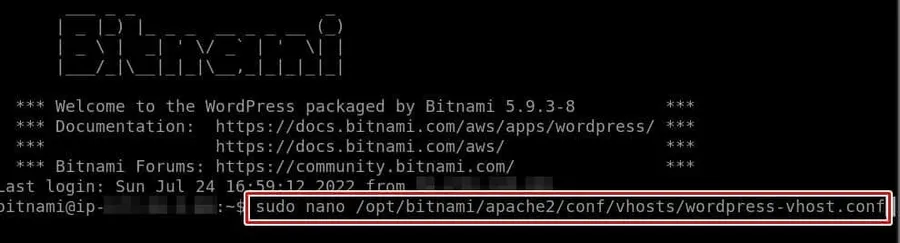
Typical Bitnami locations include:
/opt/bitnami/apache2/conf/vhosts/wordpress-vhost.confor
/opt/bitnami/apache2/conf/vhosts/wordpress-https-vhost.confDepending on whether the site is using HTTP or HTTPS.
The Setting That Caused the Problem
After reviewing the configuration, the issue became obvious.
Apache was not configured to allow .htaccess overrides.
Inside the WordPress directory block, the AllowOverride directive needed to be changed.
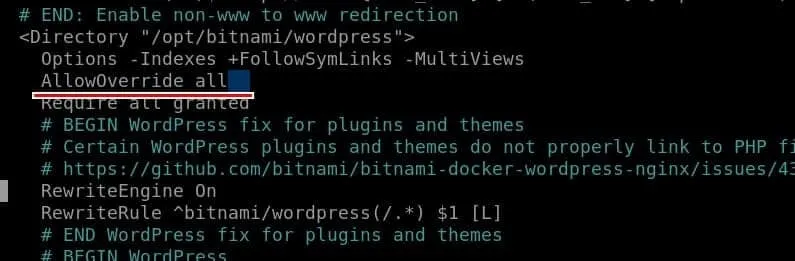
The relevant section should look like this:
<Directory "/opt/bitnami/wordpress">
    Options -Indexes +FollowSymLinks -MultiViews
    AllowOverride all
    Require all granted
</Directory>
This single line is what allowed Apache to start processing .htaccess rules again.
For this particular case, WordPress .htaccess not working was caused entirely by Apache ignoring the file.
Restarting Apache Is Required
One mistake that often causes confusion is forgetting to restart Apache after making the change.
Without a restart, the configuration remains unchanged even though the file was edited successfully.
sudo /opt/bitnami/ctlscript.sh restart apacheAfter restarting the service, the server immediately began responding to rewrite rules.
Testing Redirect Rules After the Fix
Once AllowOverride was enabled, redirect rules started behaving normally.
A simple IP-to-domain redirect worked instantly:
<IfModule mod_rewrite.c>
RewriteEngine On
RewriteCond %{HTTP_HOST} ^12\.34\.56\.789$
RewriteRule ^(.*)$ https://www.example.com/$1 [L,R=301]
</IfModule>
Before enabling AllowOverride, the same rule produced no response at all.
After the change, redirects fired correctly and URL consolidation started working again.
What Changed After the Fix
The difference was immediate. The WordPress .htaccess not working problem disappeared as soon as Apache began processing .htaccess directives correctly.
Several issues disappeared at once:
- Redirect rules began working
- IP address access could be redirected properly
- WWW and non-WWW cleanup worked correctly
- URL duplication became easier to control
- Rewrite-based plugins behaved normally
For search visibility, having a single canonical version of each URL is much cleaner than allowing multiple versions of the same page to remain accessible.
The fix also made future redirect management much easier because .htaccess changes were finally being recognized by the server.
Before Editing Server Files
A few precautions are worth taking:
- Create a backup of the configuration file
- Check both HTTP and HTTPS virtual hosts
- Restart Apache after every modification
- Test redirects manually after changes
- Verify that rewrite rules are being processed
These small checks can prevent hours of troubleshooting later.
Final Thoughts
If you are troubleshooting WordPress .htaccess not working on AWS Lightsail or Bitnami WordPress, checking AllowOverride should be one of the first diagnostic steps.
On Bitnami Lightsail installations, AllowOverride is often the first place worth checking. Once Apache starts reading .htaccess properly, redirects, security rules, and rewrite configurations usually begin working immediately.
What surprised me most was how much time I spent inspecting redirect rules before looking at the server configuration. After changing a single setting and restarting Apache, every rewrite rule started behaving exactly as expected.
FAQ
Why is WordPress .htaccess not working even though the rules are correct?
Apache may be configured with AllowOverride disabled. In that case, the server ignores the .htaccess file entirely.
Does WordPress .htaccess not working affect redirects?
Yes. Redirects, rewrite rules, security rules, and caching directives can all fail when Apache ignores .htaccess.
Do I need to restart Apache after changing AllowOverride?
Yes. Without restarting Apache, the new configuration will not be applied.