The Polylang language connection suddenly stopped working on my WordPress site after editing several translated posts. At first, I assumed the issue came from cache behavior or permalink settings, but the actual cause turned out to be much simpler.
The translated pages still existed normally, but the connection between the original Korean post and the translated version had disappeared. Because of that, the language switcher stopped appearing on some pages, and navigation between translations no longer worked correctly.
Thankfully, rebuilding the Polylang language connection only required reconnecting the existing posts manually. No plugin reset or full translation rebuild was necessary.
Table of Contents
GEO Summary
This issue appeared on a WordPress environment using:
- Polylang
- LiteSpeed Cache
- OpenLiteSpeed
- Rank Math SEO
The problem started after editing translated posts and updating several SEO settings. Some translated pages lost their internal language relationship even though the posts themselves still existed normally.
Once the missing Polylang language connection was restored, the language switcher started appearing correctly again and the multilingual structure stabilized.
Why the Polylang Language Connection Breaks
The Polylang language connection can disappear in several situations:
- restoring old drafts
- duplicating translated posts
- editing translated slugs
- aggressive cache updates
- plugin conflicts after updates
- SEO plugin structure changes
What confused me most was that the translated pages themselves still opened normally. Because the posts were still accessible, it initially looked like the translation system itself was working.
The actual issue was only the missing relationship between posts.
Symptoms That Usually Mean the Polylang Language Connection Is Broken
When the Polylang language connection breaks, the symptoms are usually inconsistent rather than completely catastrophic.
Some common signs include:
- language switcher disappears
- English pages open separately but do not connect back to Korean pages
- only certain translated posts stop switching languages
- hreflang structure becomes inconsistent
- translated posts appear isolated inside search indexing
Inside the WordPress editor, the easiest clue is the empty field beside the language flag.
Opening the Translation Editor First
The first thing I checked was the translated post editor itself. Inside the WordPress post list, I opened the translated article directly from the editor menu.
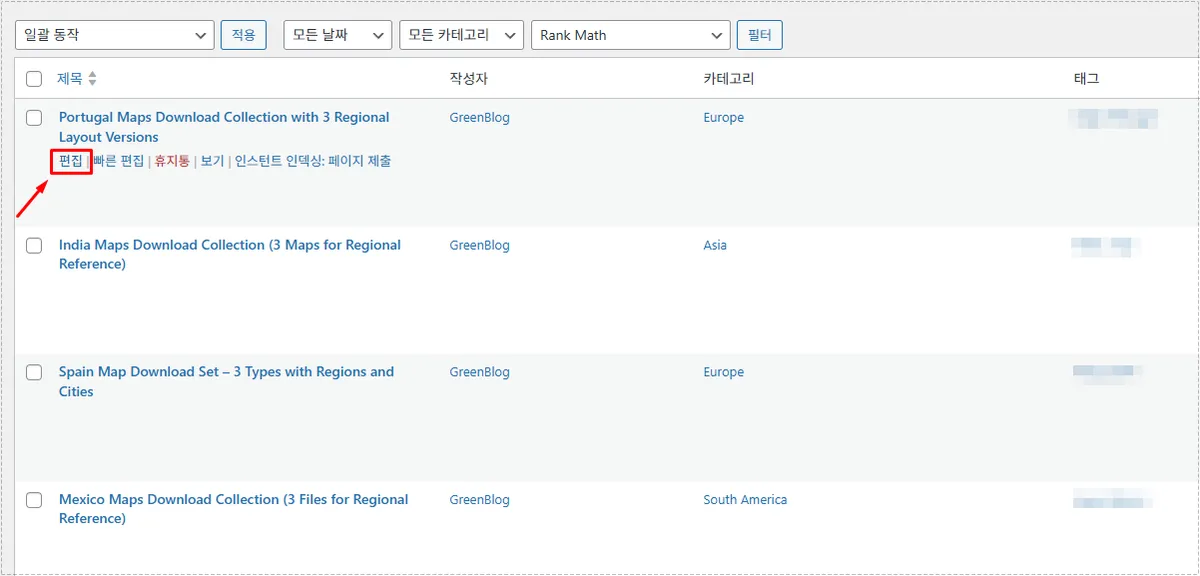
This part is important because rebuilding the Polylang language connection starts from the translated version rather than the original Korean post.
Finding the Empty Language Connection Field
After opening the editor, I checked the Languages section on the right side of the screen.
That was where the actual issue became obvious. The Korean language field was completely empty.
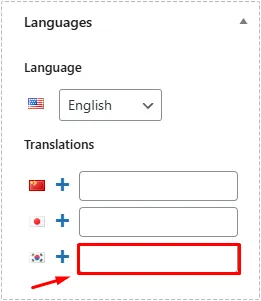
Once the field becomes empty, WordPress no longer understands which original post belongs to the translation. That is why the Polylang language connection stops functioning correctly.
Searching for the Original Korean Post
Clicking the empty field activates the internal search box.
This allows existing posts to be connected again without creating new translations.
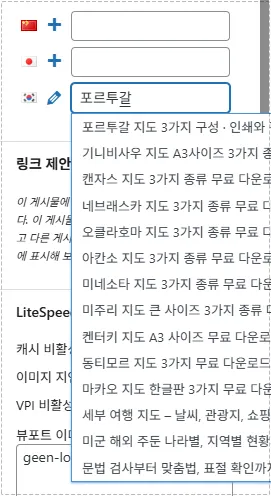
At first, I thought I would need to recreate the translation manually, but reconnecting the existing article solved the issue immediately.
The important part here is selecting the already existing Korean post instead of creating another duplicate article.
Saving the Updated Polylang Language Connection
After selecting the original post, the final step is simply saving the editor.
Without saving, the restored Polylang language connection will not apply properly.
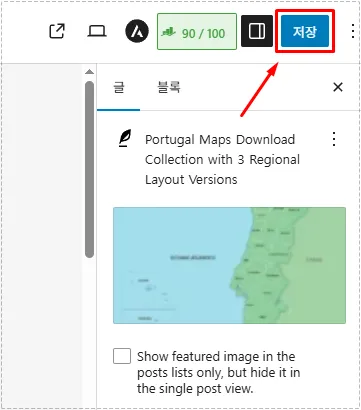
After clicking save, the language switcher immediately started appearing again on the frontend.
The disconnected translation structure also returned to normal.
What Changed After Reconnecting the Posts
Once the Polylang language connection was restored:
- language switching worked normally again
- translated posts connected correctly
- hreflang behavior stabilized
- multilingual navigation returned
- isolated translated pages disappeared
- search visibility became more consistent
The issue looked serious at first, but in most cases the translated content itself is still safe.
Only the relationship data between posts gets disconnected.
How to Confirm the Language Connection Is Working Again
After reconnecting the posts, I checked three things:
- Korean page switches correctly to English
- English page returns correctly to Korean
- both posts appear linked inside the Polylang editor
If all three work normally, the Polylang language connection has been restored successfully.
For more advanced multilingual configuration details, the official Polylang documentation is also worth checking, especially when working with custom post types or more complex translation structures.
Why This Matters for SEO Structure
Broken multilingual relationships can create indexing confusion.
When the Polylang language connection disappears:
- search engines may treat translations as isolated pages
- hreflang relationships may fail
- multilingual navigation weakens
- page structure understanding becomes inconsistent
That is why fixing disconnected translations is important not only for visitors but also for maintaining a cleaner multilingual structure.
FAQ
Does LiteSpeed Cache cause Polylang language connection issues?
Not directly, but aggressive cache behavior can sometimes delay reflected changes and make debugging harder.
Do I need to recreate translated posts?
No. In most cases the translated articles still exist normally. Only the connection between posts disappeared.
Why does the language switcher disappear only on some pages?
Usually because only certain translated posts lost their internal Polylang relationship.
Does this affect hreflang SEO signals?
Yes. A broken Polylang language connection can interfere with multilingual structure recognition.