WordPress Sidebar Slider Not Showing Images was a problem I ran into while trying to improve internal navigation inside a WordPress sidebar. The goal was simple: display several featured posts as rotating images so visitors could discover more content without relying only on text links. The images uploaded correctly, but nothing appeared on the frontend. In some cases the slider area remained blank, and in others the image appeared but never moved.
What made the issue confusing was that the media files themselves were not broken. The images existed inside WordPress and could be opened normally. The problem was hidden somewhere between the plugin configuration, widget placement, and slider frame settings. A single missing step was enough to make the entire slider look broken.
This test environment was running WordPress with a traditional sidebar layout and SiteOrigin widgets. No server-side errors appeared, no PHP warnings were generated, and the theme loaded normally. That made troubleshooting more difficult because the problem looked like a display issue even though the actual cause was inside the slider configuration.
After going through the setup process again and testing each section one by one, the slider started displaying correctly and automatic image transitions began working as expected. The sections below follow the same troubleshooting sequence that led to the fix.
Table of Contents
GEO Summary
Environment
- WordPress
- SiteOrigin Widgets Bundle
- Sidebar Widget Area
- Image-based post promotion
- Internal traffic navigation
Symptoms
- Slider area empty
- Images not appearing
- Images visible but not rotating
- Sidebar display not updating
Fix Direction
- Configure animation speed and timeout
- Install required plugin
- Add SiteOrigin Slider widget
- Create slider frames
- Upload background images
Why WordPress Sidebar Slider Not Showing Images Happens
The most common reason behind WordPress Sidebar Slider Not Showing Images is that users upload images but never create slider frames. The slider widget depends on frames rather than directly displaying media library images, even when the WordPress Sidebar itself is loading correctly.
Another common issue is assuming that WordPress includes a built-in image slider. Standard WordPress widgets do not provide rotating WordPress Sidebar image functionality. A dedicated slider widget must be installed and configured first.
Without those components, the WordPress Sidebar loads normally but the slider section remains empty.
Installing the Required Slider Plugin
The troubleshooting process started by checking whether the SiteOrigin slider functionality was actually available inside WordPress.
The SiteOrigin Widgets Bundle plugin provides the slider widget needed for sidebar image rotation. Without it, the widget options never appear in the sidebar configuration area.

After installing and activating the plugin, the slider widget became available in the widget management section.
Creating the Slider Container First
After activation, the next step was adding the SiteOrigin Slider widget itself. Simply installing the plugin does not create a working slider.
The widget must be placed inside the desired sidebar area before any images can appear.
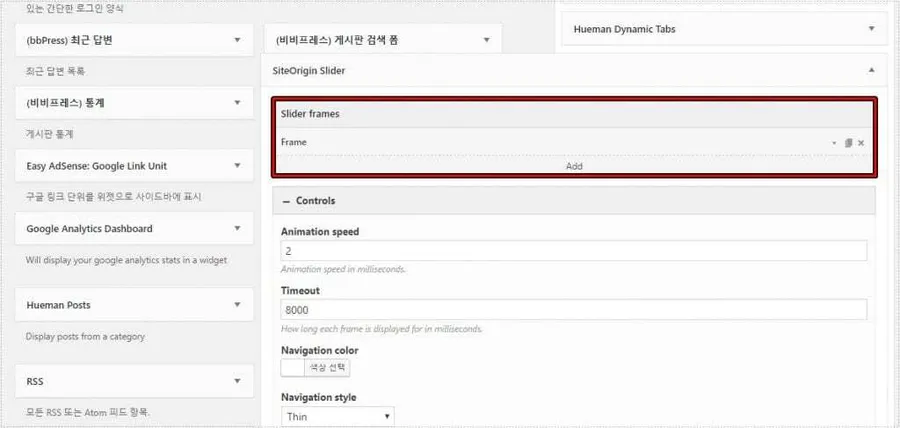
At this stage the slider still appeared empty because no image frames had been added yet.
The Missing Step That Prevented Images From Appearing
This turned out to be the most important part of the entire setup. The slider uses individual frames, and each frame represents one slide.
Without creating a frame, uploaded images have nowhere to display.
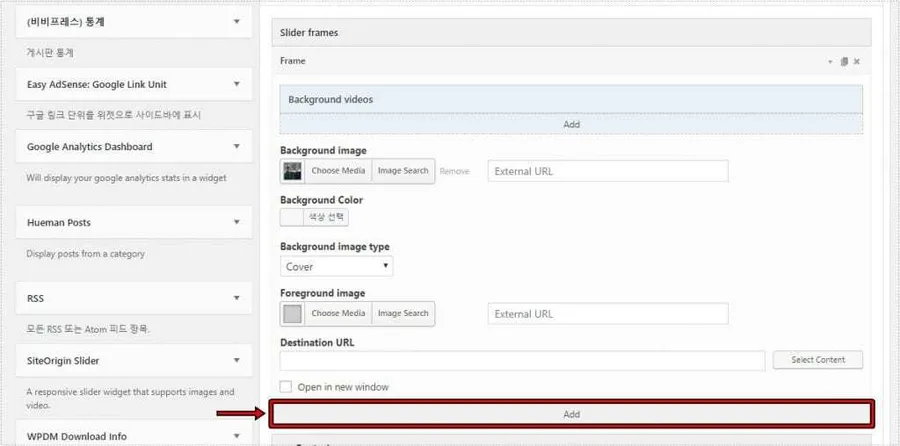
Once the frame was created, the image upload options finally became available.
Uploading Images Correctly
After the frame exists, WordPress displays the background image section.
This is where many people assume the slider should already work. In reality, the image must be attached to the frame itself.
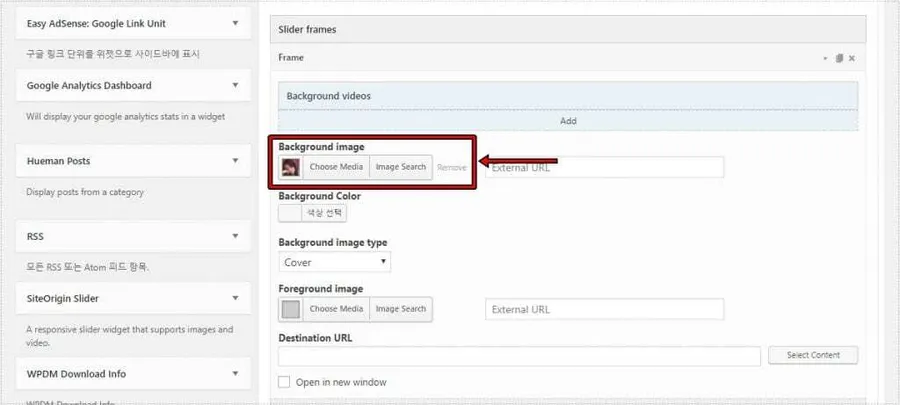
After assigning the image, the empty slider area disappeared and the first image became visible.
Making the Slider Clickable
One reason I wanted a sidebar slider was to direct visitors toward specific articles. Simply showing images was not enough.
The destination URL field allows every slide to act as a navigation element.
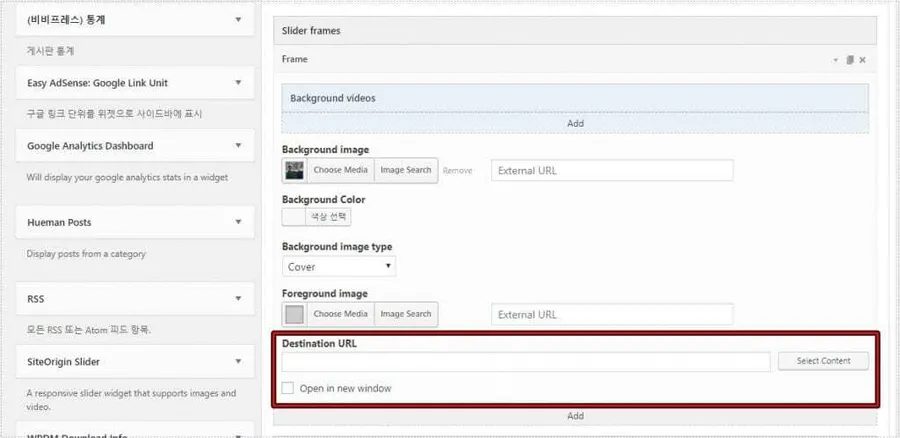
Once URLs were added, the slider became more than a visual element. It started functioning as an internal navigation tool that could guide visitors toward important content.
Why the Slider Looked Frozen
Even after images appeared, there was still one confusing issue. The slider seemed completely static.
The reason turned out to be the timing configuration.
Animation Speed controls the transition speed.
Timeout controls how long a slide remains visible.
If these values are too high, the slider can look like it is not moving at all.
WordPress Sidebar Slider Not Showing Images and Rotation Settings
This is another situation where WordPress Sidebar Slider Not Showing Images can be misdiagnosed. The images may actually be loading correctly, but the timing values make the rotation appear inactive.
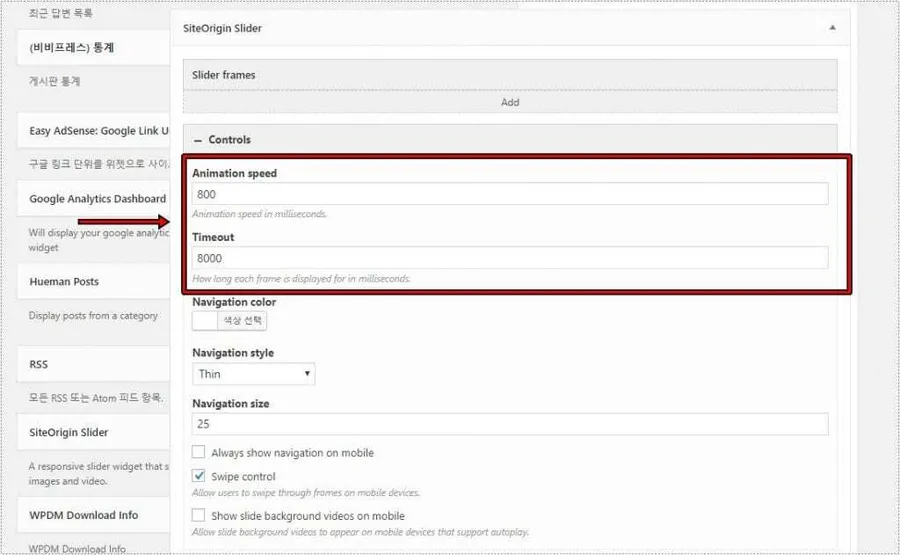
After adjusting both values, image transitions became visible immediately.
Verifying the Final Result
The final test involved checking the frontend WordPress Sidebar.
The images rotated automatically, navigation arrows appeared correctly, and each slide linked to the intended content.

The issue was completely resolved without modifying theme files, adding custom code, or changing server settings.
Changes After the Fix
After completing the setup, several improvements became noticeable:
- Featured posts received more clicks.
- Sidebar content became visually easier to notice.
- Internal navigation improved.
- Visitors spent more time exploring related articles.
- The sidebar looked more active and less static.
The most important discovery was that the problem was not caused by WordPress itself. In nearly every test, the missing frame creation step or timing configuration was responsible for the behavior.
FAQ
Why is my SiteOrigin slider completely blank?
Most cases occur because no slider frame has been created. Images must be attached to frames before they can display.
Can WordPress create a rotating sidebar image slider without a plugin?
Not normally. WordPress does not include a built-in sidebar slider widget.
Why do my images show but never move?
Check the animation speed and timeout values. Extreme settings can make the slider appear frozen.