WordPress Google Fonts Removal became something I looked into while investigating slow page loads on a WordPress site running OpenLiteSpeed and LiteSpeed Cache. The site was already using page caching, image optimization, and CSS/JS improvements, yet performance reports still showed additional external requests during rendering.
At first, I assumed large images were responsible for most of the delay. After checking multiple performance tools and browser requests, it became clear that Google Fonts were still being loaded from external servers. That extra request was not huge by itself, but when combined with mobile networks and render-blocking resources, it added unnecessary latency.
This environment was running WordPress with OpenLiteSpeed, LiteSpeed Cache, HTTP/3, and server-level caching. The symptoms appeared mainly in performance reports where external font requests continued showing up even after other optimizations were completed.
Table of Contents
Why WordPress Google Fonts Removal Matters
The issue is not the font itself. The problem comes from the additional connection required to download font resources from Google’s servers.
When a browser has to wait for external font files, page rendering can be delayed. Depending on the theme and font configuration, this may contribute to slower Largest Contentful Paint (LCP) values and visible layout changes during loading.
In my case, the website was already reasonably fast, but performance reports consistently showed external font requests that could be removed.
Using LiteSpeed Cache to Remove Google Fonts
The quickest method was through LiteSpeed Cache.
Inside the optimization settings, there is an option that disables Google Fonts across the site. For many WordPress installations, this is the easiest way to handle WordPress Google Fonts Removal without editing theme files.
The setting immediately reduced external font requests and simplified the page loading sequence.
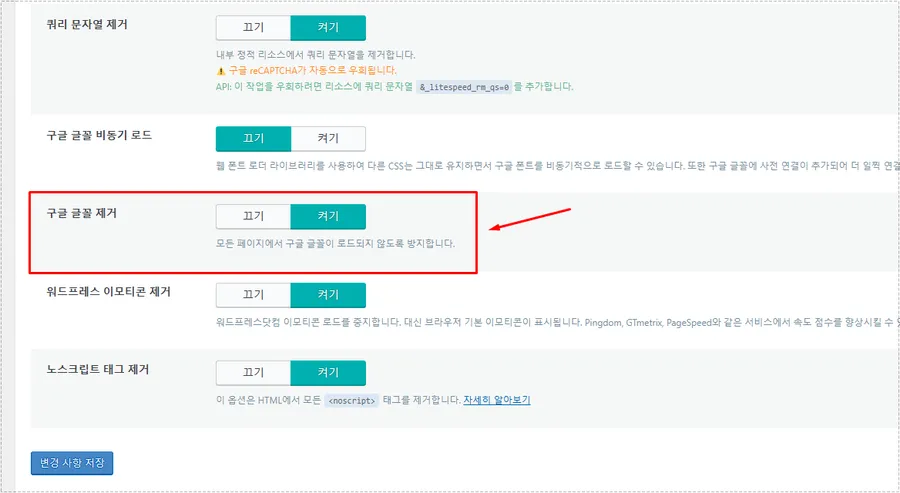
After enabling the option, I cleared LiteSpeed Cache and tested the site again. On several pages, Google Fonts requests disappeared completely.
When LiteSpeed Cache Is Not Enough
Some themes and plugins load fonts directly through custom functions.
In those situations, the LiteSpeed Cache setting may not remove every request. The site might still load fonts from Google even though the optimization option is enabled.
That is where manual code removal becomes useful.
WordPress Google Fonts Removal Using functions.php
For themes that register fonts through WordPress enqueue functions, removing the font handle directly can work.
The important detail is that every theme may use a different handle name. If the handle is incorrect, the font request remains active even though the code looks correct.
While checking an Astra Child Theme installation, I reviewed the theme files and tested font-related enqueue functions directly from the child theme configuration.
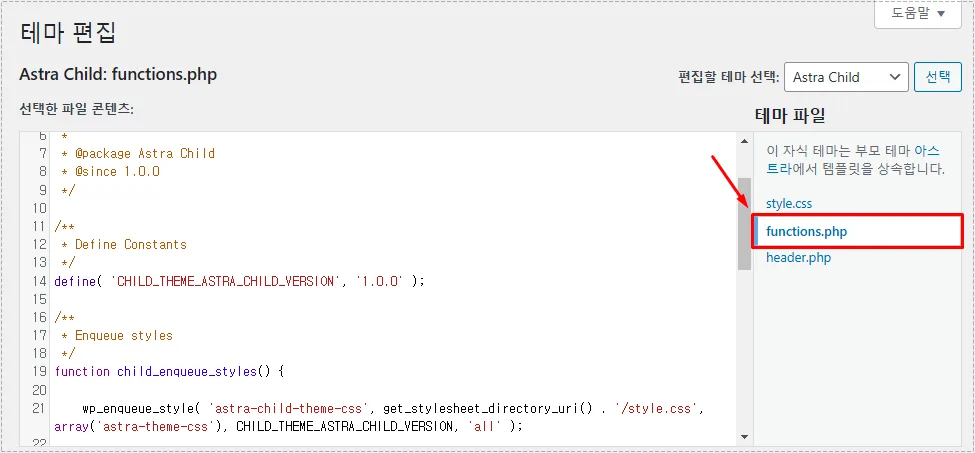
This approach provides more control than plugin settings, especially when a theme loads fonts through custom code rather than standard WordPress options.
Checking Whether Fonts Are Still Loading
One mistake I made during testing was assuming the removal had worked simply because the settings were enabled.
The faster method is to verify the result directly inside Chrome DevTools.
Open the Network tab, switch to the Font filter, and check whether external font requests are still being loaded. If Google-hosted fonts continue appearing, further investigation is necessary.
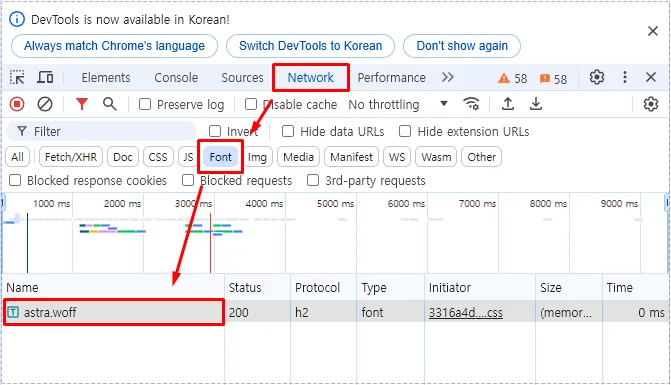
This verification step was more useful than relying on optimization settings alone. It immediately confirmed whether WordPress Google Fonts Removal was actually successful.
What Changed After Removing Google Fonts
The difference was not dramatic enough to cut loading times in half, but several improvements became noticeable.
External requests decreased, rendering became more predictable, and performance reports became cleaner. Mobile pages felt slightly more responsive because fewer resources were being requested during the initial page load.
PageSpeed and GTmetrix reports also stopped flagging some external font-related recommendations.
For OpenLiteSpeed users, combining server caching, LiteSpeed Cache optimization, image compression, and WordPress Google Fonts Removal created a noticeably cleaner performance profile.
Final Thoughts
WordPress Google Fonts Removal is one of those small optimizations that often gets overlooked. Many site owners focus on image compression and caching while external font requests continue loading in the background.
The biggest lesson from this process was not the removal itself but the verification step. A setting may appear enabled, yet the browser can still request fonts through a theme or plugin. Checking DevTools and confirming actual network requests provided a much clearer answer than performance scores alone.
FAQ
Does WordPress Google Fonts Removal improve PageSpeed scores?
It can help reduce external requests and improve certain performance metrics, especially when Google Fonts are loaded on multiple pages.
Can LiteSpeed Cache remove Google Fonts automatically?
In many cases yes. However, some themes load fonts differently, so additional testing may still be necessary.
How do I know if Google Fonts are still loading?
Open Chrome DevTools, go to the Network tab, filter by Font, and check for requests to Google font services.