WordPress bulk text removal becomes necessary when the same shortcode, disclaimer, advertisement block, or outdated sentence appears across dozens or even hundreds of posts.
I ran into this issue while managing a WordPress site with a large content library. Editing each article individually would have taken hours, and there was a high chance of missing some posts. Instead of relying on manual updates, I decided to remove the text directly from the database using a single SQL query.
The process was tested on a WordPress installation running with CyberPanel and OpenLiteSpeed. Although the change itself was simple, making sure the correct database and query were selected was the most important part of the entire operation.
Table of Contents
GEO Summary
Environment tested:
- WordPress
- OpenLiteSpeed
- CyberPanel
- MariaDB
- phpMyAdmin
Issue:
- The same text block appeared in many posts.
- Manual editing was impractical.
- Content consistency needed to be restored quickly.
Fix:
- Access phpMyAdmin.
- Locate the correct WordPress database.
- Execute a targeted SQL REPLACE query.
- Verify content updates after completion.
Why WordPress Bulk Text Removal Became Necessary
The need for WordPress bulk text removal usually appears after a plugin is removed, a shortcode becomes obsolete, or a standard text block is no longer needed.
In my case, the same content had been inserted into numerous posts. Removing it manually would have required opening each article, searching for the text, saving changes, and repeating the process over and over again. As the number of posts grows, this quickly becomes inefficient.
A direct database modification provided a much faster solution.
Accessing phpMyAdmin Through CyberPanel
Before performing WordPress bulk text removal, access to the site’s database is required. Since WordPress stores post content inside the database, this is where the replacement process takes place.
CyberPanel makes this fairly straightforward because phpMyAdmin can be launched directly from the Databases section.
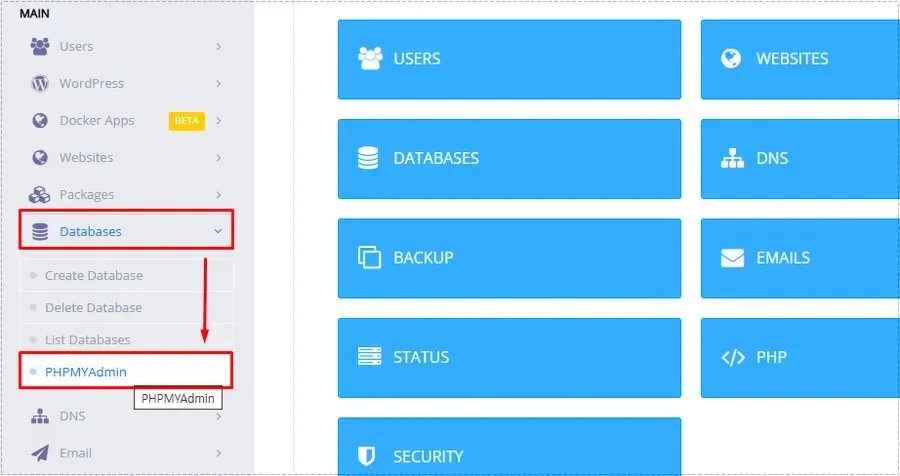
This step is important because all content modifications will be executed directly against the database rather than through the WordPress editor.
Selecting the Correct Database
One of the easiest mistakes during WordPress bulk text removal is choosing the wrong database.
Servers that host multiple websites often contain several databases, and modifying the wrong one can affect an entirely different site.
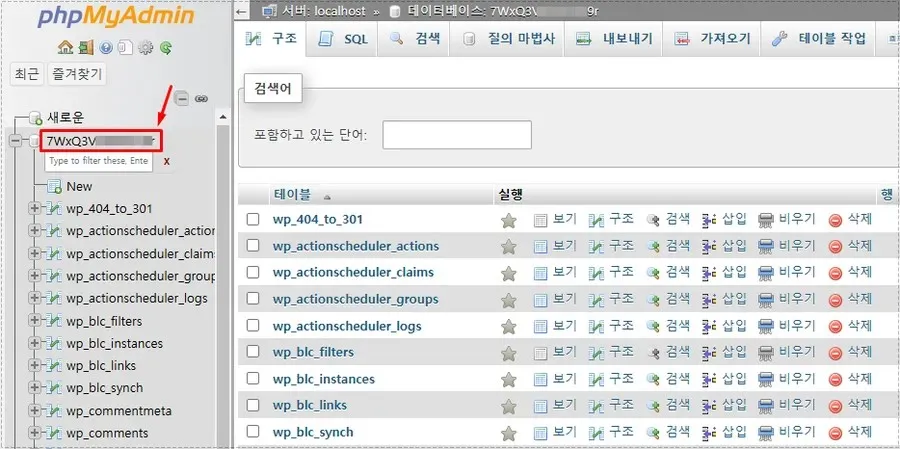
Before proceeding, I verified the database name used by the target WordPress installation and confirmed that the expected WordPress tables were present.
Running the SQL Query for WordPress Bulk Text Removal
Once the correct database is selected, the SQL tab becomes the main workspace for WordPress bulk text removal.
The SQL editor allows direct modifications to post content without opening individual posts.
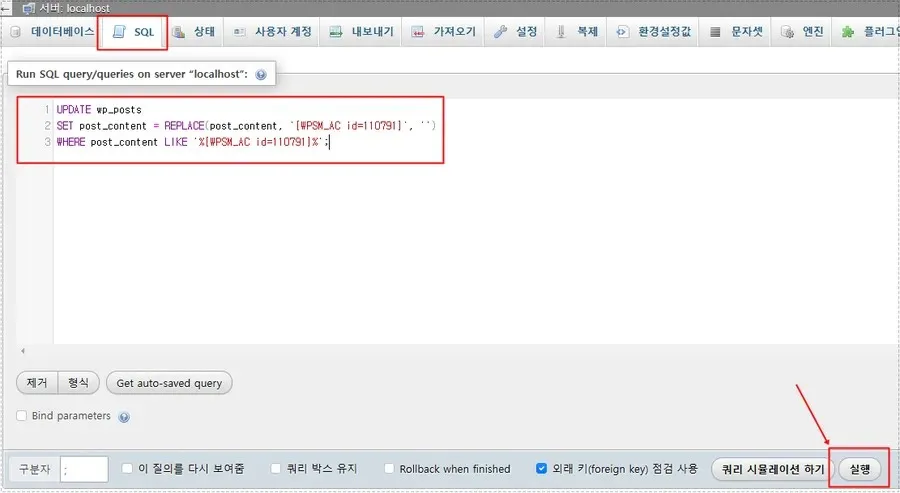
The query used was:
UPDATE wp_posts
SET post_content = REPLACE(post_content, 'text_to_remove', '')
WHERE post_content LIKE '%text_to_remove%';
This command searches every post stored in the wp_posts table and removes the specified text wherever it appears.
Because WordPress bulk text removal directly changes stored content, creating a database backup before running the query is strongly recommended.
Verifying the Query Result
After execution, phpMyAdmin immediately displays a success message showing how many rows were affected.
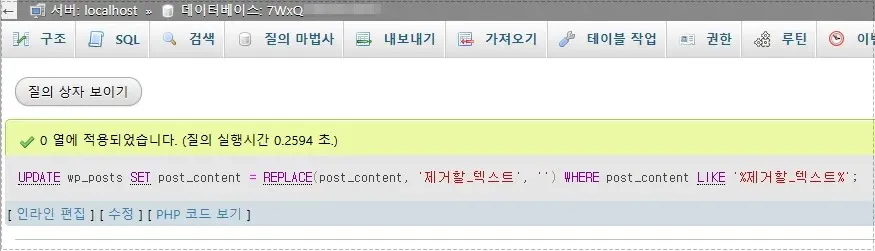
The confirmation screen helped verify that the query completed successfully and that the database accepted the changes.
I also checked several posts inside WordPress afterward to confirm that the unwanted content had been removed correctly.
What Changed After the Cleanup
After completing the WordPress bulk text removal process, the changes were visible immediately.
Several improvements became noticeable:
- Repeated content disappeared across all affected posts.
- Post formatting became cleaner.
- Outdated shortcodes and text blocks were removed consistently.
- Content maintenance became easier.
- Future editing requirements were reduced.
What would have taken hours through manual editing was completed in seconds through a single database operation.
Important Checks Before Running the Query
Although WordPress bulk text removal is simple, a few precautions are worth taking.
Always create a database backup before making changes. Double-check the text you intend to remove and verify the table name before executing the query.
Testing the query on a staging site first can also help avoid accidental content modifications.
Final Thoughts
For websites with only a handful of posts, manual editing may still be reasonable. Once a site reaches dozens or hundreds of articles, however, WordPress bulk text removal becomes far more practical through direct database editing.
The biggest lesson from this process was that the SQL query itself was easy. Most of the risk came from selecting the correct database and verifying the replacement target. After confirming those details, the cleanup was completed almost instantly and the content library became much easier to maintain.
FAQ
Is WordPress bulk text removal safe?
Yes, but only when a database backup is created beforehand. The query directly modifies stored content.
Can I remove a shortcode using WordPress bulk text removal?
Yes. The same SQL method works for removing old shortcodes, ad snippets, or repeated text blocks.
Does LiteSpeed Cache need to be cleared afterward?
If cached versions of pages exist, clearing LiteSpeed Cache helps ensure visitors see the updated content immediately.