The first time I encountered this OpenLiteSpeed HTTP 404 issue, I assumed the HTTPS redirect rule was broken. HTTPS pages loaded normally, but every HTTP request immediately returned a 404 error.
What made the problem confusing was that the rewrite rules looked correct. The redirect code was already in place, and WordPress itself was functioning normally. From the outside, it appeared to be a simple redirect failure.
The actual cause turned out to be much deeper in the OpenLiteSpeed listener configuration.
Table of Contents
GEO Summary
Environment
- WordPress
- OpenLiteSpeed
- CyberPanel
- Let’s Encrypt SSL
- LiteSpeed Cache
Symptoms
- HTTPS worked normally
- HTTP returned 404 errors
- Redirect rules existed but never executed
- Search engines could still discover HTTP URLs
Actual Fix
The rewrite rule was not the problem. The HTTP listener lacked a proper Virtual Host Mapping configuration, which was ultimately responsible for the OpenLiteSpeed HTTP 404 issue.
Main Headings
Why the OpenLiteSpeed HTTP 404 Issue Appears
One misconception is that HTTPS redirects automatically handle every HTTP request.
In OpenLiteSpeed, the redirect rule only works after the incoming request has been associated with a valid virtual host.
If the HTTP listener does not know which virtual host should handle the request, OpenLiteSpeed cannot execute the rewrite rule. Instead, the request ends with a 404 response.
That behavior is why an OpenLiteSpeed HTTP 404 issue often appears even when the redirect rule itself is technically correct.
What Confused Me During Troubleshooting
Initially, I spent time reviewing rewrite rules.
The redirect logic looked normal:
RewriteEngine On

RewriteCond %{HTTPS} off
RewriteRule ^(.*)$ https://%{HTTP_HOST}%{REQUEST_URI} [L,R=301]
Because the rule was correct, I expected HTTP traffic to move directly to HTTPS.
What confused me most was that the redirect never triggered. The request failed before reaching the rewrite engine.

The redirect rule should still be configured because it handles the actual HTTP-to-HTTPS transition after OpenLiteSpeed receives the request correctly.
For additional protection, I also redirected direct IP access to the primary domain to prevent duplicate URL paths.
Why Virtual Host Mapping Matters More Than the Redirect Rule
The actual cause of the OpenLiteSpeed HTTP 404 issue was hidden inside the listener configuration.
OpenLiteSpeed receives requests through listeners first. Those listeners then decide which virtual host should process the request.
Without a mapping, the server receives the request but has nowhere to send it.
The result is:
- HTTP request arrives
- Listener accepts connection
- No virtual host assignment exists
- Request processing stops
- 404 response returned
The redirect rule never gets a chance to execute.
Checking the HTTP Listener Configuration
While investigating the OpenLiteSpeed HTTP 404 issue, I opened the Listeners section in OpenLiteSpeed WebAdmin and reviewed the listener assigned to port 80.
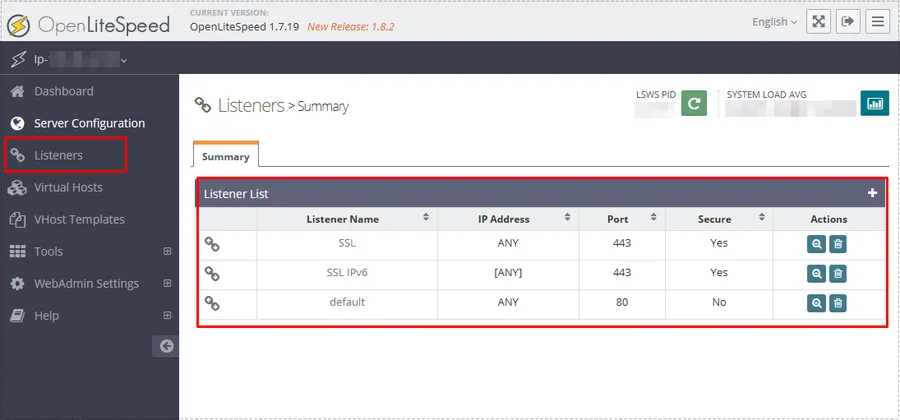
At first glance everything appeared normal because the HTTP listener existed and was running.
The missing piece was inside the mapping configuration attached to that listener.
Configuring Virtual Host Mapping
To fix the OpenLiteSpeed HTTP 404 issue, I reviewed the Virtual Host Mappings section inside the HTTP listener.
A missing or incomplete mapping was preventing requests from reaching the correct site configuration.
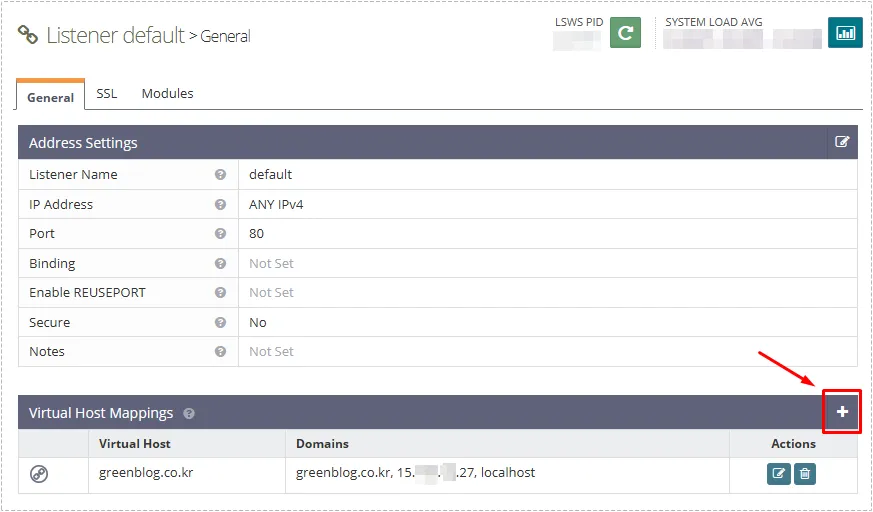
The fix involved adding the appropriate virtual host and associating all expected hostnames.
The Mapping Configuration That Solved the Problem
Inside the mapping screen, I added:
- primary domain
- www domain
- server IP address
- localhost
This ensured that OpenLiteSpeed could recognize every incoming HTTP request and assign it correctly.
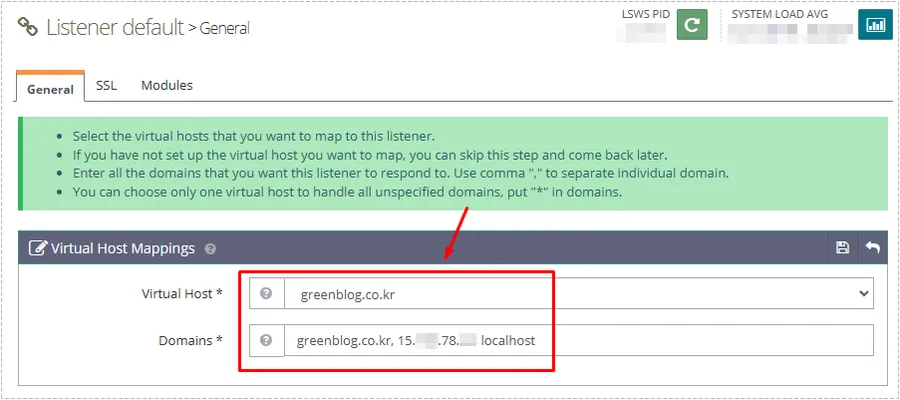
After saving the configuration, I restarted OpenLiteSpeed from WebAdmin.
Without a restart, the new mapping may not become active immediately.
Verifying That the Redirect Works
Browser testing can confirm the redirect, but I prefer checking directly from the server.
The following command provides a much clearer answer:
curl -I http://your-domain.comA successful configuration returns a 301 response.
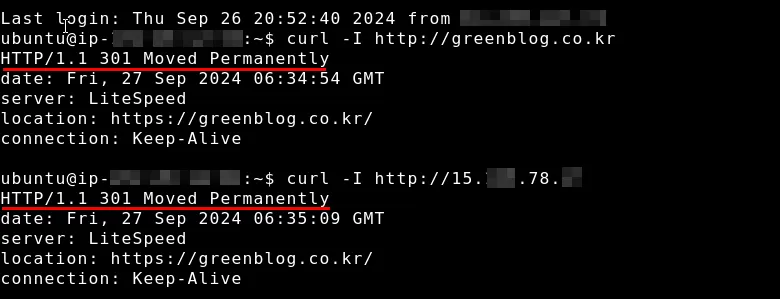
The response should contain:
HTTP/1.1 301 Moved Permanently
Location: https://your-domain.com/
At that point, the OpenLiteSpeed HTTP 404 issue has been resolved.
Problem Cause Analysis
The root cause was not:
- WordPress
- LiteSpeed Cache
- SSL certificates
- CyberPanel rewrite rules
The root cause was a missing Virtual Host Mapping on the HTTP listener.
Because OpenLiteSpeed could not associate incoming HTTP requests with a valid virtual host, requests terminated before the rewrite engine processed them.
Real Fix Process
The troubleshooting sequence that ultimately worked was:
- Verify HTTPS functionality
- Review rewrite rules
- Confirm SSL configuration
- Inspect OpenLiteSpeed listeners
- Check Virtual Host Mapping
- Add domain, IP, and localhost entries
- Restart OpenLiteSpeed
- Verify with curl
The listener mapping step solved the OpenLiteSpeed HTTP 404 issue immediately.
Changes After Fix
After correcting the mapping configuration, the OpenLiteSpeed HTTP 404 issue disappeared completely.
- HTTP requests redirected correctly
- 404 errors disappeared
- Direct IP access redirected properly
- Search engine crawlers received consistent URLs
- Site structure became cleaner
- URL canonicalization became more reliable
- Redirect behavior remained stable during future updates
The most noticeable improvement was that every request followed a predictable path instead of failing before reaching the redirect rule.
FAQ
Why does OpenLiteSpeed show 404 even when a redirect rule exists?
Because the request may never reach the rewrite engine. Missing Virtual Host Mapping can stop processing before redirects execute.
Is the rewrite rule still necessary?
Yes. The mapping allows OpenLiteSpeed to process the request, while the rewrite rule performs the HTTPS redirect.
Should the server IP be included in Virtual Host Mapping?
Including the server IP helps handle direct IP requests and can prevent unexpected routing behavior.
Do I need to restart OpenLiteSpeed after changing mappings?
Yes. Restarting ensures the listener configuration is reloaded correctly.