The OpenLiteSpeed HTTP/3 setup looked enabled on my server at first, but Chrome DevTools continued showing h2 instead of h3. Since OpenLiteSpeed officially supports HTTP/3, I originally assumed the feature was already working automatically.
What confused me most was that there were no visible errors inside CyberPanel or OpenLiteSpeed WebAdmin. The site loaded normally, HTTPS worked correctly, and LiteSpeed Cache had no obvious issues. But after checking the protocol behavior more carefully, the actual cause turned out to be missing UDP 443 access and an inactive QUIC listener setting.
Once both were enabled properly, the OpenLiteSpeed HTTP/3 setup started working normally and HTTP/3 traffic finally appeared in the browser network panel.
Table of Contents
GEO Summary
This environment was tested on WordPress with OpenLiteSpeed, CyberPanel, LiteSpeed Cache, and AWS Lightsail. The issue appeared while verifying HTTP/3 behavior after enabling SSL and QUIC support. Even though HTTP/3 options existed inside WebAdmin, the browser continued using HTTP/2 until UDP 443 and QUIC listener settings were fully configured.
Why the OpenLiteSpeed HTTP/3 Setup Looked Broken
At first, the server configuration seemed correct.
- HTTPS was active
- TLS 1.3 was enabled
- LiteSpeed Cache worked normally
- SSL certificates loaded correctly
But Chrome DevTools continued displaying h2 inside the protocol column. That immediately made the OpenLiteSpeed HTTP/3 setup look incomplete.
The confusing part is that OpenLiteSpeed can support HTTP/3 while the browser still temporarily uses HTTP/2 connections. Cached sessions and existing browser connections often delay visible protocol changes.
That made troubleshooting much harder than expected.
Understanding How HTTP/3 Actually Works
HTTP/3 behaves differently from HTTP/2 because it uses QUIC over UDP instead of traditional TCP connections.
That means simply opening standard HTTPS traffic on TCP 443 is not enough.
For the OpenLiteSpeed HTTP/3 setup to function correctly:
- UDP 443 must be accessible
- QUIC support must be enabled
- Browsers must support HTTP/3
- CDN routing behavior may affect results
If any of these fail, the browser quietly falls back to HTTP/2.
Checking Whether HTTP/3 Was Really Enabled
Before changing server settings, I tested the domain using an external HTTP/3 verification tool.
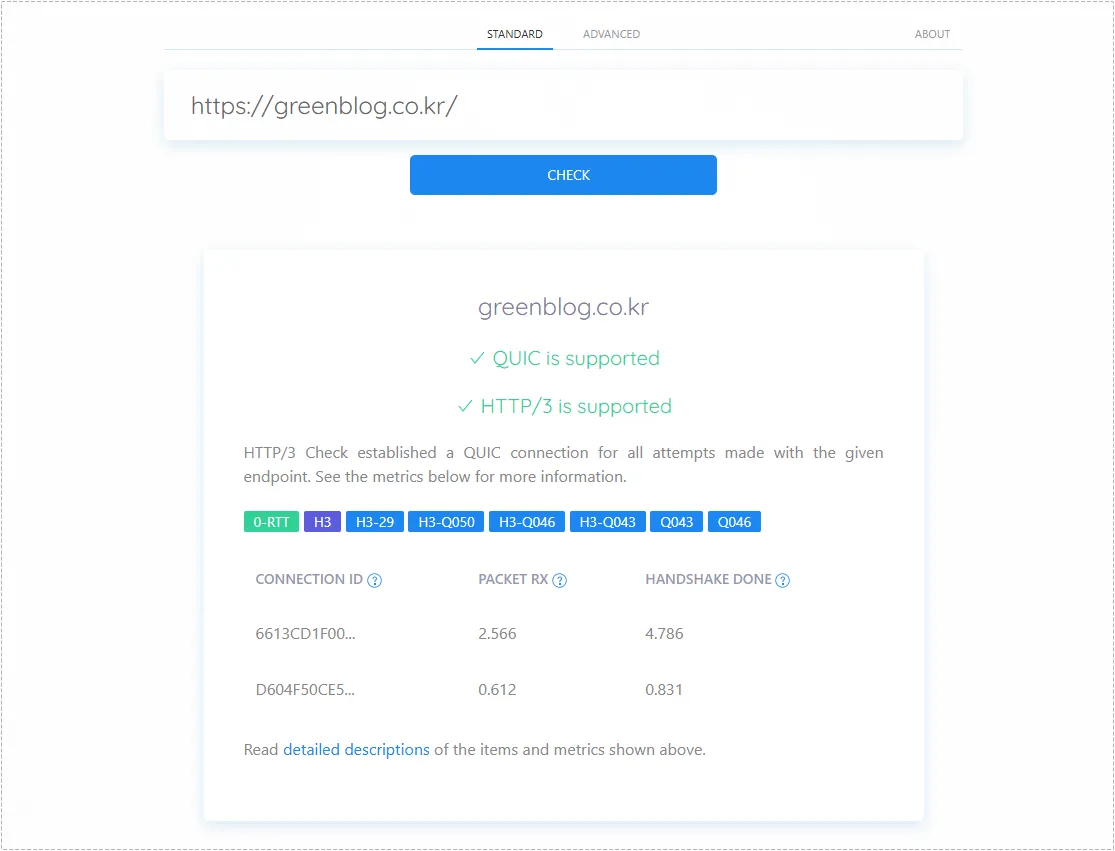
The useful part here was seeing whether QUIC negotiation actually succeeded. Once the test showed both:
- QUIC is supported
- HTTP/3 is supported
the problem became easier to narrow down.
The Real Cause: UDP 443 Was Missing
The actual issue turned out to be much simpler than expected.
The OpenLiteSpeed HTTP/3 setup itself was mostly correct, but AWS Lightsail only had TCP 443 open. Since HTTP/3 depends on UDP traffic, the server could never establish QUIC connections properly.
After opening UDP 443 inside the Lightsail firewall settings, HTTP/3 traffic immediately started behaving differently.
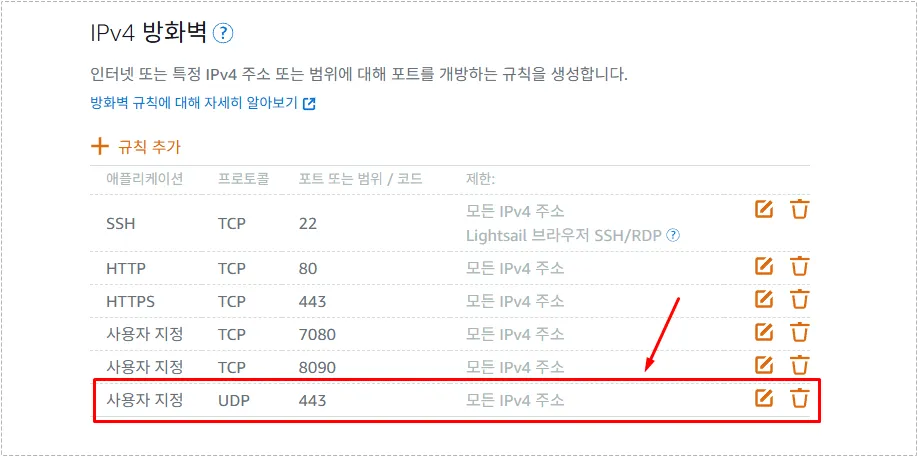
The important detail is that HTTP/3 requires both:
- TCP 443 for HTTPS fallback
- UDP 443 for QUIC communication
Without UDP access, browsers silently continue using HTTP/2.
Enabling QUIC Inside OpenLiteSpeed WebAdmin
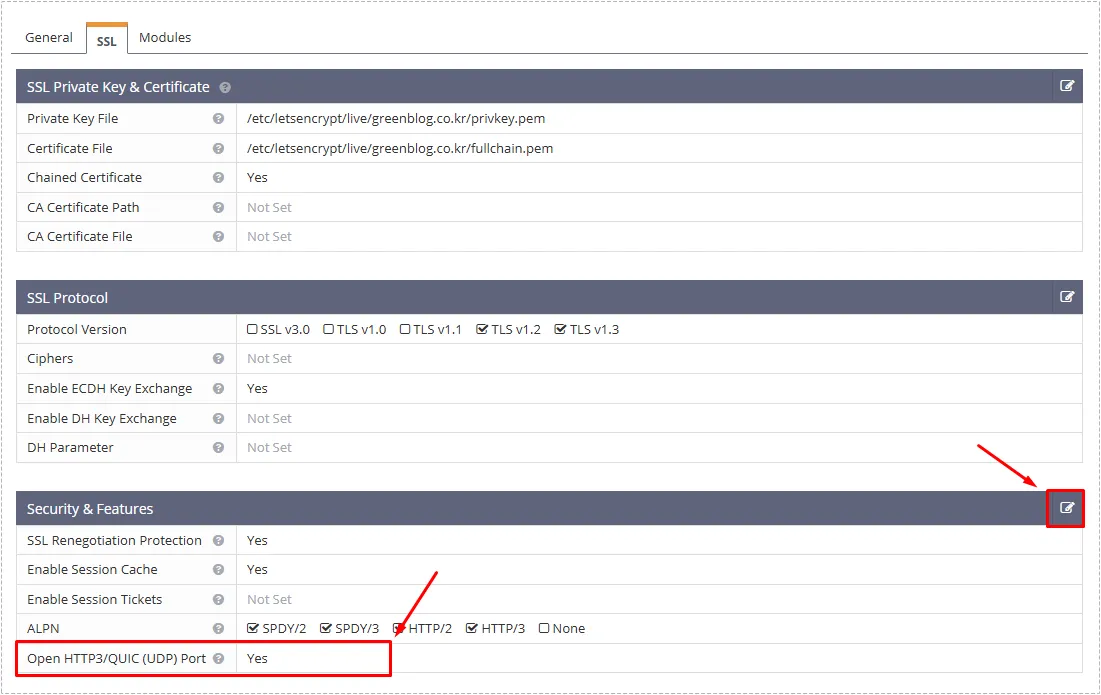
After opening UDP 443, I still needed to finish the OpenLiteSpeed HTTP/3 setup inside WebAdmin.
The option is slightly hidden under the SSL listener configuration.
Path used:
- Listeners
- SSL listener (443)
- SSL tab
- Security & Features
Inside that section, the Open HTTP3/QUIC (UDP) Port option needed to be changed to Yes.
The QUIC Port Option That Actually Matters
This single setting ended up being the most important part of the entire OpenLiteSpeed HTTP/3 setup.
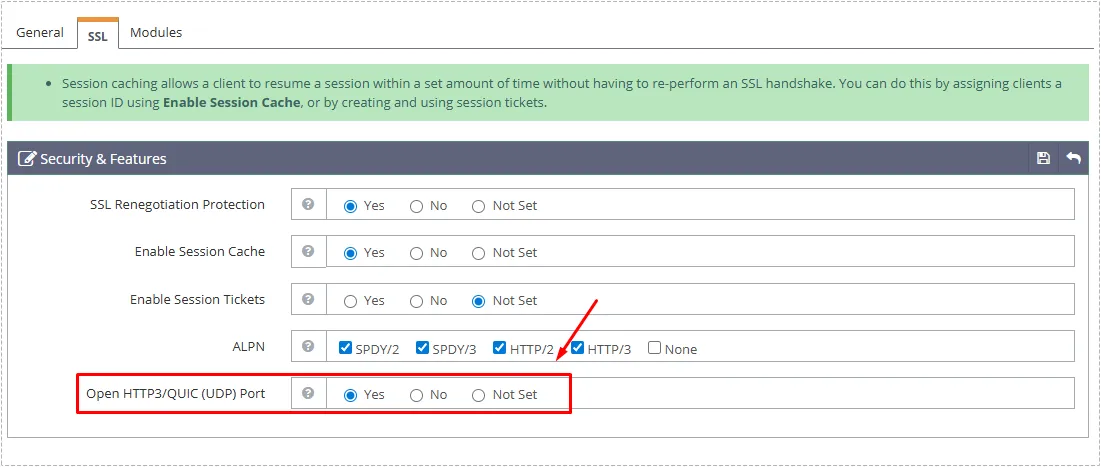
At first, I assumed enabling TLS 1.3 alone would automatically activate HTTP/3 support. That turned out to be incorrect.
QUIC must be explicitly enabled.
After saving the setting, a graceful restart was required before the browser recognized the protocol properly.
Why Chrome Still Showed h2 After the Fix
Even after completing the OpenLiteSpeed HTTP/3 setup, Chrome DevTools initially continued showing h2.
That caused another round of confusion.
The actual reason was browser connection reuse and cache behavior.
Opening a fresh private window solved it immediately.
Inside Chrome DevTools:
- Open Network tab
- Right-click the column area
- Enable Protocol column
- Refresh the page
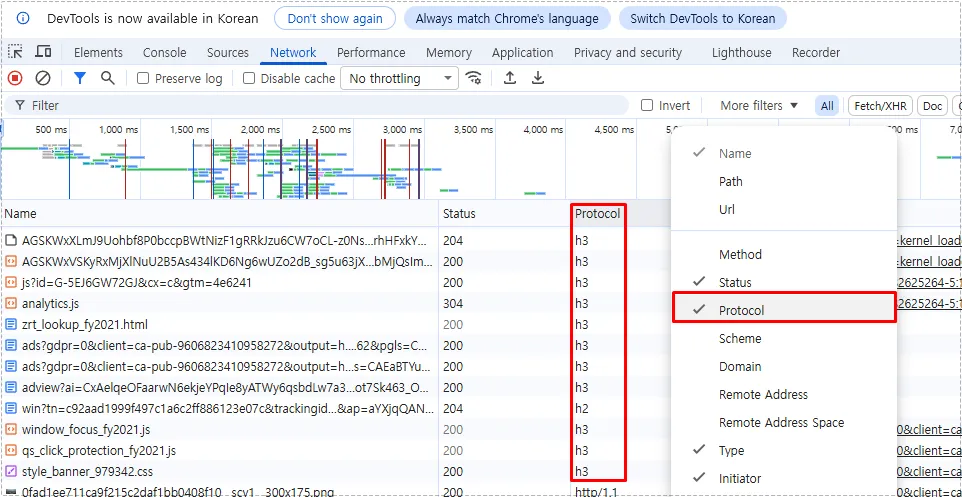
Once cache reuse disappeared, the OpenLiteSpeed HTTP/3 setup finally showed active h3 connections correctly.
Changes After the Fix
After completing the configuration:
- HTTP/3 traffic started appearing consistently
- QUIC negotiation succeeded properly
- Browser fallback behavior stabilized
- Mobile network loading felt smoother
- TLS negotiation delays became less noticeable
The biggest improvement was not raw speed, but connection stability under inconsistent network conditions.
That’s especially noticeable on mobile connections and international traffic.
FAQ
Why does Chrome still show h2 after enabling HTTP/3?
Browsers often reuse existing HTTP/2 connections temporarily. Testing in a private window or clearing cache usually resolves this.
Is UDP 443 required for OpenLiteSpeed HTTP/3 setup?
Yes. HTTP/3 depends on QUIC over UDP. Without UDP 443, browsers cannot establish HTTP/3 connections.
Does LiteSpeed Cache affect HTTP/3?
Not directly. However, aggressive browser cache behavior can delay visible protocol changes during testing.
Does HTTP/3 work behind a CDN?
Partially. Browser-to-CDN traffic may use HTTP/3, while CDN-to-origin traffic often remains on HTTP/2.