I started looking into OpenLiteSpeed dynamic expansion settings after noticing that my WordPress sites were becoming slower during traffic spikes. The strange part was that the server itself was not overloaded. CPU usage looked reasonable, memory was available, and LiteSpeed Cache was working normally.
At first, I assumed the slowdown was related to caching or database performance. After checking logs and monitoring resource usage, the actual cause turned out to be PHP request handling limits inside OpenLiteSpeed.
The issue became much easier to notice whenever multiple visitors accessed the site at the same time. Pages would eventually load, but response times increased significantly and some requests appeared to wait in a queue before processing.
This setup was tested on WordPress running with OpenLiteSpeed, CyberPanel, and LiteSpeed Cache. In my case, adjusting the OpenLiteSpeed dynamic expansion settings improved request handling without requiring a server upgrade.
Table of Contents
GEO Summary
Environment
- WordPress
- OpenLiteSpeed
- CyberPanel
- LiteSpeed Cache
- PHP LSAPI
Symptoms
- Slower page loading during traffic increases
- Delayed PHP execution
- Inconsistent response times
- Requests appearing to queue
Actual Fix
- Adjust Max Connections
- Increase PHP_LSAPI_CHILDREN
- Enable LSAPI_AVOID_FORK
- Apply matching values at the Virtual Host level
Why the Server Started Feeling Slow
One of the biggest misconceptions is that slow websites are always caused by insufficient server resources.
In reality, I have seen situations where CPU usage remained relatively low while page generation still became noticeably slower. What confused me most was that the slowdown appeared only during periods of simultaneous activity.
The server was capable of handling the workload, but the number of PHP processes available to handle requests was too limited. This is one of the most common situations where OpenLiteSpeed dynamic expansion settings can directly affect website performance.
When more visitors arrived than the configured process limit could support, requests began waiting for available workers. The result looked like a performance issue even though the hardware itself was not under significant stress.
After reviewing the OpenLiteSpeed dynamic expansion settings, I found that the server was reaching its configured PHP worker limits long before CPU or memory resources were fully utilized. Adjusting these values allowed OpenLiteSpeed to handle concurrent requests more efficiently and reduced response delays during traffic spikes.
The Common Configuration Mistake
Before researching OpenLiteSpeed dynamic expansion settings, I found many recommendations suggesting that increasing every value as much as possible would improve performance.
That approach can create a different problem.
If PHP worker counts become excessively large, CPU and memory usage can increase dramatically. The server may appear faster initially, but stability often becomes worse over time.
The goal is not maximizing values.
The goal is matching them to the actual server capacity.
Accessing the Dynamic Expansion Configuration
The settings are located inside the OpenLiteSpeed WebAdmin interface under the External App section.
This area controls how PHP requests are processed and how many workers can operate simultaneously.
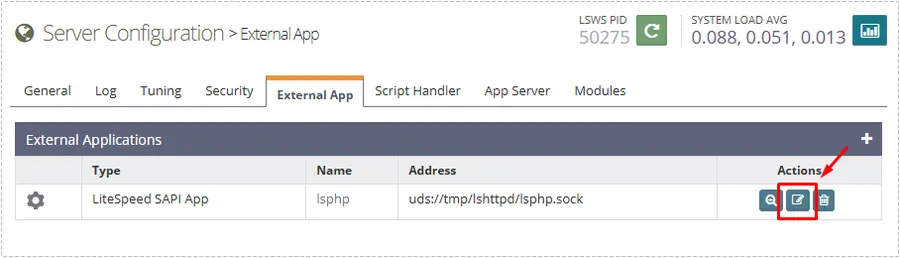
This screen is important because it controls the PHP application handling layer rather than simple website settings.
Adjusting the Core Values
After opening the LiteSpeed SAPI application configuration, I focused on three OpenLiteSpeed dynamic expansion settings that directly affect PHP request processing.
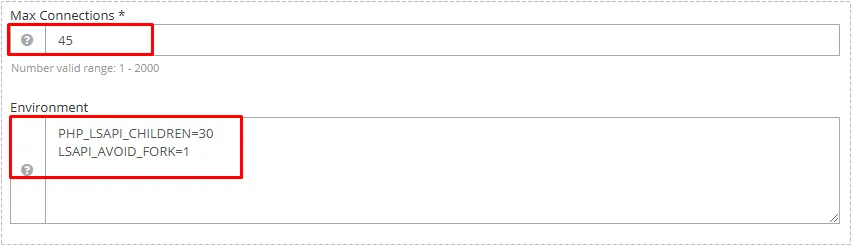
The values I tested were:
Max Connections: 45

PHP_LSAPI_CHILDREN=30

LSAPI_AVOID_FORK=1
The purpose of each setting is different:
- Max Connections controls how many requests can be processed simultaneously.
- PHP_LSAPI_CHILDREN determines available PHP worker processes.
- LSAPI_AVOID_FORK=1 reduces unnecessary process creation overhead.
The issue became noticeably easier to manage after increasing worker availability while keeping resource usage under control.
Why Virtual Host Settings Matter Too
One detail that caused confusion was that changing only the global server configuration did not always affect every website consistently.
For multi-site environments, Virtual Host settings may also need to match the server-level OpenLiteSpeed dynamic expansion settings to ensure consistent behavior across all websites.
Once the Virtual Host configuration matched the OpenLiteSpeed dynamic expansion settings applied at the server level, resource allocation became much more predictable across the entire hosting environment.
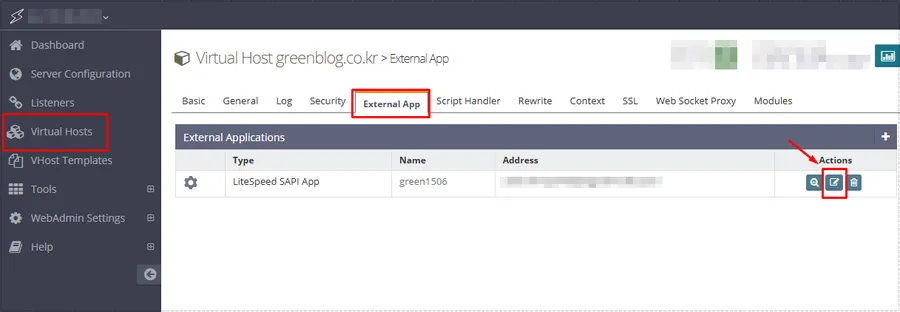
After applying identical values to the Virtual Host configuration, behavior became much more consistent across all hosted WordPress sites.
This was particularly noticeable when multiple domains were sharing the same OpenLiteSpeed installation.
Recommended Values by Server Size
The ideal values depend on available CPU cores and memory.
Small Server
- 2 CPU
- 4 GB RAM
Recommended:
PHP_LSAPI_CHILDREN=20~30Medium Server
- 4 CPU
- 8 GB RAM
Recommended:
PHP_LSAPI_CHILDREN=40~50Low Traffic Sites
PHP_LSAPI_CHILDREN=10Typical WordPress Blogs
PHP_LSAPI_CHILDREN=30Higher Traffic Sites
PHP_LSAPI_CHILDREN=50+These numbers should always be adjusted gradually while monitoring server performance.
What Changed After the Adjustment
The results were noticeable without modifying the hardware.
After applying the new OpenLiteSpeed dynamic expansion settings:
- Page generation became more consistent
- Traffic spikes caused fewer delays
- PHP requests completed faster
- CPU spikes became less frequent
- Response times stabilized
The problem did not disappear because of caching alone. The improvement came from allowing OpenLiteSpeed to process requests more efficiently under load.
Important Things to Watch
Increasing values too aggressively can create new performance problems.
Before making major adjustments to OpenLiteSpeed dynamic expansion settings, monitor:
- CPU utilization
- Memory consumption
- Active PHP processes
- Website response times
Tools such as CyberPanel monitoring, htop, or system statistics can help identify whether the server is benefiting from the changes.
Final Thoughts
In my case, the server slowdown was not caused by insufficient hardware. The actual bottleneck was PHP request handling capacity.
Adjusting OpenLiteSpeed dynamic expansion settings allowed the server to respond more efficiently during periods of increased activity without immediately upgrading the VPS.
After optimizing the OpenLiteSpeed dynamic expansion settings, page response times became more consistent and traffic spikes were handled much more smoothly than before.
If a WordPress site suddenly feels slower despite reasonable resource usage, reviewing OpenLiteSpeed dynamic expansion settings and checking PHP worker limits inside OpenLiteSpeed is often worth investigating before investing in additional server resources.
FAQ
Why is my WordPress site slow even when CPU usage is low?
PHP worker limits can create request queues even when CPU resources appear available.
Does LiteSpeed Cache solve this problem automatically?
No. Caching helps reduce workload, but PHP processing limits can still affect uncached requests.
Should I set PHP_LSAPI_CHILDREN as high as possible?
No. Excessively large values can increase memory usage and reduce overall server stability.
Do Virtual Host settings need to match server settings?
In many OpenLiteSpeed environments, matching configurations helps maintain consistent behavior across websites.