The Polylang Japanese excerpt length issue became much easier to notice after I started adding more translated Japanese posts to a WordPress site.
At first, everything looked normal inside the editor. The actual problem appeared on category pages and archive layouts where Japanese excerpts suddenly became extremely long and pushed the entire page structure out of place.
This setup was running on WordPress with Polylang, Astra Theme, OpenLiteSpeed, and LiteSpeed Cache. The issue mainly affected Japanese translation pages because WordPress excerpt handling behaves differently for languages that do not use spaces consistently.
What confused me most was that English and Korean excerpts were working normally while only Japanese pages kept breaking the layout.
Table of Contents
Why the Polylang Japanese Excerpt Length Issue Started Appearing
The Polylang Japanese excerpt length issue comes from the way WordPress handles default excerpts.
By default, WordPress trims excerpts based on spaces between words. That works fine for English because words are separated naturally. Japanese text behaves differently because sentences usually do not contain spaces in the same way.
As a result, WordPress sometimes fails to detect a proper cutoff point and outputs a much longer excerpt than expected.
The problem became especially noticeable on:
- homepage post grids
- category pages
- archive layouts
- search result pages
- translated Polylang content
In my case, the Astra post layout became visually inconsistent because some Japanese excerpts stretched much longer than the surrounding cards.
Checking the Polylang Language Configuration
Before modifying the excerpt behavior, I checked the language settings inside Polylang first.
Some users manually change the locale or language code for convenience. That can create unexpected behavior because certain WordPress functions no longer recognize Japanese properly.
Inside the language settings, the Japanese language should normally use:
- Locale: ja
- Language code: ja
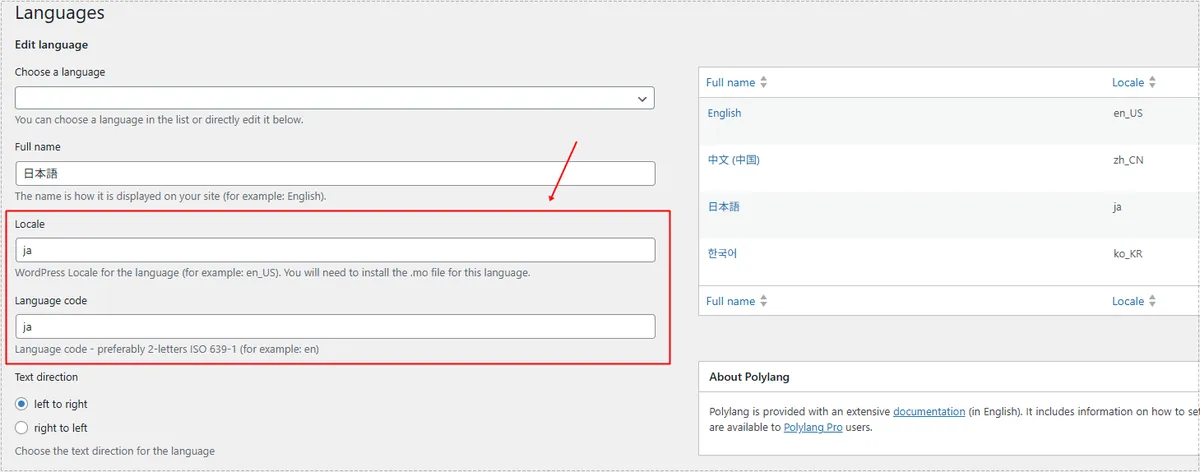
At first, I assumed the issue was entirely caused by LiteSpeed Cache or excerpt filters. The actual cause turned out to be a combination of Japanese text handling and WordPress excerpt behavior.
Changing the language code after publishing many translated posts can also create URL structure problems, redirect inconsistencies, and indexing instability. Because of that, I decided to keep the existing Polylang structure and solve the problem through functions.php instead.
Using functions.php to Fix the Polylang Japanese Excerpt Length Issue
The actual fix was much simpler than I originally expected.
Instead of relying on WordPress default excerpt trimming, I added a custom character limit directly through functions.php.
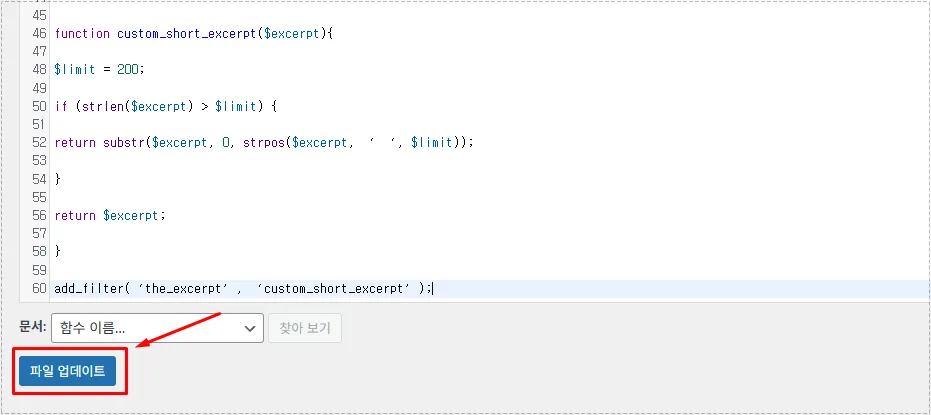
The following code trims excerpts based on character length rather than spaces:
function custom_short_excerpt($excerpt){

    $limit = 200;

    if (strlen($excerpt) > $limit) {

        return substr($excerpt, 0, strpos($excerpt, ' ', $limit));
    }

    return $excerpt;
}

add_filter('the_excerpt', 'custom_short_excerpt');
This reduced the Polylang Japanese excerpt length issue immediately after the cache was refreshed.
Accessing the functions.php File Safely
The code was added through the WordPress theme editor.
Inside the WordPress dashboard, the file appeared under:
Appearance → Theme File Editor → functions.php
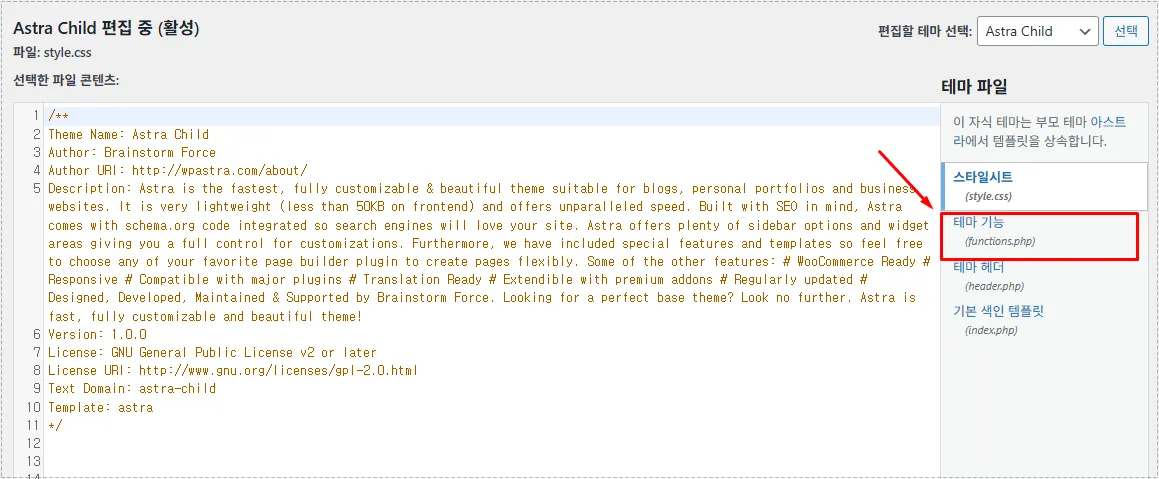
I strongly recommend using a child theme before modifying functions.php.
Without a child theme, future theme updates can overwrite the changes completely. That part becomes easy to forget until the problem suddenly reappears after an update.
Applying the Excerpt Fix and Updating the File
After inserting the code near the bottom of functions.php, the changes started working immediately once the file was updated and LiteSpeed Cache was cleared.
What confused me initially was that the problem still appeared temporarily because LiteSpeed Cache continued serving the older cached layout.
After purging the cache completely, the Japanese excerpts finally started displaying correctly across:
- homepage layouts
- archive pages
- category pages
- search result pages
The page structure immediately became easier to scan because the post cards returned to consistent heights again.
Changes After Fixing the Polylang Japanese Excerpt Length Issue
Once the fix was applied properly, the entire front page layout became much more stable.
Before the change:
- Japanese excerpts stretched unpredictably
- archive layouts looked uneven
- some pages became visually cluttered
- category grids lost alignment
After the fix:
- excerpts stopped overflowing
- homepage cards aligned normally
- category pages became cleaner
- translated pages looked more consistent
The improvement was especially noticeable on mobile layouts where oversized excerpts previously pushed other elements too far down the page.
The issue also became less noticeable in search previews because metadata consistency improved across translated pages.
FAQ
Why does the Polylang Japanese excerpt length issue happen?
WordPress excerpts normally rely on spaces between words. Japanese text does not behave the same way, so excerpts can become unusually long.
Does LiteSpeed Cache affect excerpt updates?
Yes. Older cache files can continue showing the previous excerpt behavior until the cache is purged.
Should I change the Japanese locale inside Polylang?
Not necessarily. If many translated posts already exist, changing locale settings may create URL or indexing problems. Using a functions.php fix is usually safer.