The Polylang complete removal process became necessary after several strange issues started appearing on one of my WordPress sites. At first, I assumed the problem came from LiteSpeed Cache or permalink behavior, but the actual cause turned out to be leftover multilingual data from Polylang.
The site was running on WordPress with OpenLiteSpeed, CyberPanel, LiteSpeed Cache, and a CDN setup. After removing the multilingual plugin, some translated URLs and language-related metadata continued appearing in search results and inside the admin area.
What confused me most was that simply deleting the plugin did not fully remove its behavior.
Some database entries, language settings, and cached metadata remained active long after the plugin itself disappeared.
Table of Contents
GEO Summary
This setup was tested on WordPress running with OpenLiteSpeed, CyberPanel, LiteSpeed Cache, and NinjaFirewall.
The issue appeared after disabling Polylang on a multilingual site. Old translation data remained inside the database and continued affecting cache behavior, search visibility, and URL structure.
The fix involved:
- plugin deactivation
- database cleanup
- wp-config.php modification
- full cache purge
- post-removal verification
After the cleanup, the site structure became much cleaner and old language-related conflicts stopped appearing.
Why the Polylang Complete Removal Became Necessary
Originally, I installed Polylang because it was one of the most popular free multilingual plugins for WordPress.
The plugin itself worked well at first.
However, after expanding the site and adding more plugins, several problems started appearing:
- plugin conflicts
- inconsistent URL behavior
- leftover translated slugs
- cache mismatch issues
- unexpected indexing behavior
- duplicated metadata
I originally thought LiteSpeed Cache was causing most of the confusion.
After testing the site inside a staging environment, the actual cause turned out to be leftover Polylang data that continued loading even after the plugin had been disabled.
Basic Polylang Removal Inside WordPress
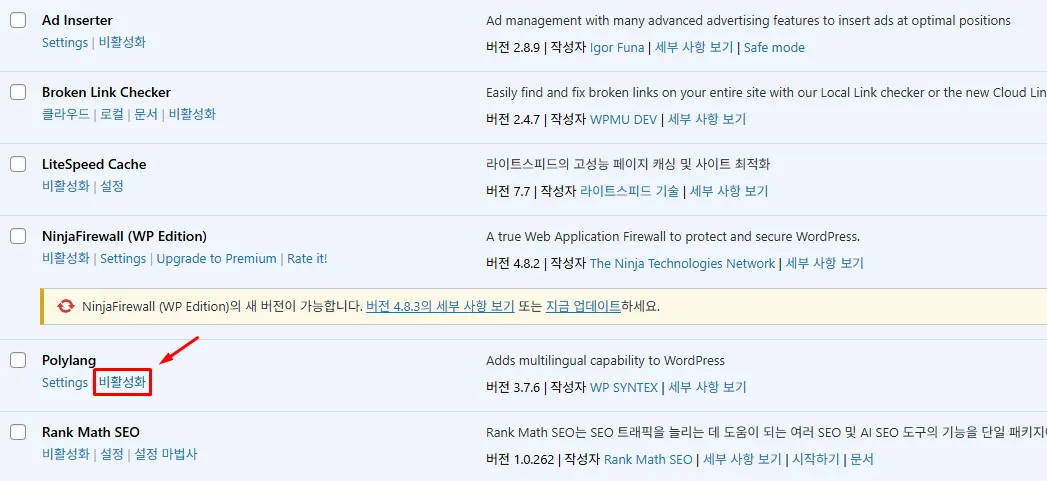
The first removal method is the simple approach.
This is usually enough if the plugin might be used again later.
Inside the WordPress plugin menu:
- deactivate Polylang
- remove the plugin
- leave the existing database data untouched
This keeps the old multilingual structure available in case the plugin needs to be restored later.
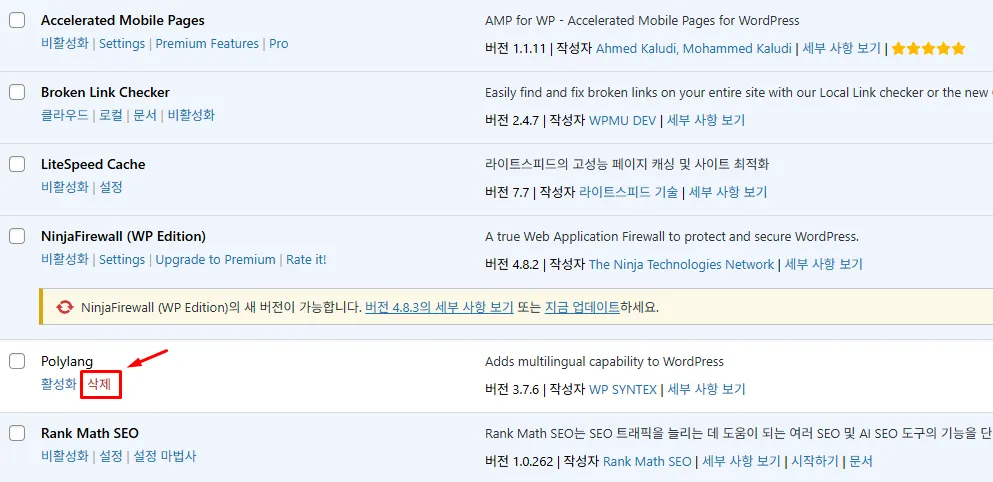
After deactivating the plugin, the delete button becomes available.
This removes the plugin files themselves but does not fully erase the database structure.
Why the Basic Removal Was Not Enough
The Polylang complete removal issue became more obvious after checking the database and cached pages.
Even after deleting the plugin:
- translated language slugs remained
- metadata references continued appearing
- old language options stayed inside wp_options
- some cache files still referenced multilingual structures
Search indexing behavior also became inconsistent for several pages.
Some old translated URLs continued appearing inside cached sitemap data.
That was the point where I realized the plugin removal itself was not the full cleanup.
Database Cleanup During Polylang Complete Removal
The next step involved removing leftover database entries manually.
Inside phpMyAdmin, several Polylang-related entries remained active.
The most common ones included:
- wp_pll_languages
- wp_pll_translations
- polylang-related options inside wp_options
I strongly recommend creating a full backup before touching the database.
In my case, I used:
- Lightsail snapshots
- WordPress backup plugin exports
- direct database export from phpMyAdmin
The issue became much easier to control once the leftover multilingual tables disappeared.
Using wp-config.php for a Full Polylang Complete Removal
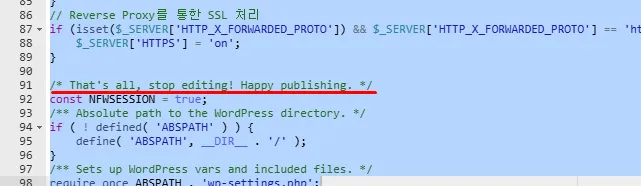
The actual cleanup became much more reliable after modifying wp-config.php.
Inside the WordPress root directory, I added:
define('PLL_REMOVE_ALL_DATA', true);This line was placed directly above:
/* That's all, stop editing! Happy publishing. */After adding the line and reloading the site, the remaining Polylang settings finally disappeared completely.
Accessing wp-config.php on OpenLiteSpeed and CyberPanel
The actual editing method depends on the hosting environment.
In my case, the site was running on OpenLiteSpeed with CyberPanel.
The easiest method was:
- CyberPanel File Manager
- right-click
- EDIT option
When using SSH, the configuration file could also be edited through:
sudo nano /home/domain/public_html/wp-config.phpFileZilla also worked fine for quick edits.
What mattered most was making sure the cleanup constant was added before reinstalling or testing another multilingual plugin.
Cache Problems After the Plugin Removal
The cache behavior became especially confusing after the Polylang complete removal process.
Even after removing the plugin:
- old URLs still loaded
- translated menu items appeared temporarily
- cached language redirects remained active
This mostly came from aggressive caching.
Inside my environment, the cleanup only became stable after purging:
- LiteSpeed Cache
- OpenLiteSpeed server cache
- CDN cache
- browser cache
Once the caches were fully cleared, the site structure finally stabilized.
Changes After the Cleanup
The difference became noticeable almost immediately.
After the full Polylang complete removal:
- old language redirects disappeared
- sitemap structure became cleaner
- duplicated metadata stopped appearing
- search indexing behavior stabilized
- plugin conflicts stopped returning
- cache refreshes became consistent again
The admin area also felt much lighter because unnecessary multilingual settings were no longer loading in the background.
What I Learned From the Polylang Complete Removal Process
At first, I assumed removing the plugin itself would be enough.
The actual issue turned out to be the leftover data structure and cached multilingual references.
That part was much harder to notice because the site still appeared normal on the surface.
The OpenLiteSpeed environment also made the issue slightly more confusing because aggressive cache behavior delayed some changes from appearing immediately.
After handling the full cleanup properly, the site structure became far easier to maintain.
FAQ
Does Polylang complete removal delete translated posts?
No. The posts themselves usually remain. The cleanup mainly removes language connections and multilingual configuration data.
Can LiteSpeed Cache affect Polylang complete removal?
Yes. Cached multilingual URLs and metadata can continue appearing until the cache is fully purged.
Is wp-config.php modification required?
Not always. However, adding the cleanup constant helps remove leftover plugin data much more completely.
Should I back up the database before deleting Polylang data?
Absolutely. Database cleanup mistakes can affect URLs, metadata, and translated content relationships.