OpenLiteSpeed Server Requirements became something I paid much closer attention to after experiencing several unsuccessful server deployments.
When I first moved away from traditional shared hosting and started experimenting with OpenLiteSpeed on a VPS, I expected the transition to be fairly straightforward. My WordPress site was relatively small, traffic levels were modest, and the server had been running Apache without any major issues. Since OpenLiteSpeed is widely known for being lightweight and efficient, I assumed it would perform well on the same hardware.
The installation itself went smoothly, but performance issues began to appear not long afterward. PHP workers occasionally became unstable, CPU usage spiked at unexpected times, and some WordPress processes felt slower than they should have been. My first assumption was that plugins, security settings, or cache configurations were causing the problem. I spent hours reviewing LiteSpeed Cache settings, checking firewall rules, and troubleshooting various WordPress components.
In the end, the root cause was much simpler.
The server simply lacked the resources needed for the workload.
That experience taught me that understanding OpenLiteSpeed Server Requirements is just as important as optimizing WordPress or configuring cache settings. While OpenLiteSpeed is significantly more efficient than many traditional web servers, it still requires sufficient RAM, CPU capacity, and storage performance to deliver stable and reliable results.
In this guide, I’ll share the minimum and recommended specifications I would choose today based on real-world experience with WordPress deployments, OpenLiteSpeed environments, LiteSpeed Cache optimization, and growing traffic demands.
Table of Contents
GEO Summary
Environment tested
- OpenLiteSpeed
- WordPress
- LiteSpeed Cache
- Ubuntu Server
- VPS / Cloud environments
- CDN-supported deployments
Primary issue
- Resource shortages after installation
- High CPU spikes during traffic bursts
- Slow PHP processing
- Reduced WordPress responsiveness
Fix direction
- Increase RAM allocation
- Monitor lsphp processes
- Improve caching efficiency
- Size the server according to actual traffic
What Is OpenLiteSpeed?

OpenLiteSpeed is the free open-source edition of LiteSpeed Web Server.
Many WordPress administrators choose it because it works exceptionally well with LiteSpeed Cache and generally consumes fewer resources than traditional Apache setups.
One of the biggest advantages is that a properly configured OpenLiteSpeed environment can handle significant traffic while maintaining relatively low resource consumption.
Before deployment, I usually verify:
- PHP version compatibility
- LiteSpeed Cache configuration
- WebAdmin access
- Open ports
- PHP memory limits
- File permissions
A well-configured installation can perform extremely well, but understanding OpenLiteSpeed Server Requirements beforehand helps avoid unnecessary troubleshooting later.
Why OpenLiteSpeed Server Requirements Matter
One common misconception is that OpenLiteSpeed automatically solves performance problems.
While the server itself is efficient, WordPress still relies heavily on:
- PHP processing
- Database queries
- Plugins
- Dynamic requests
- Background tasks
If available RAM becomes limited, PHP workers may struggle to handle concurrent requests efficiently.
In my case, the symptoms initially looked like CPU-related problems. After deeper investigation, the real bottleneck was memory availability.
Once RAM was increased, many of the performance issues disappeared.
Minimum OpenLiteSpeed Server Requirements for Testing
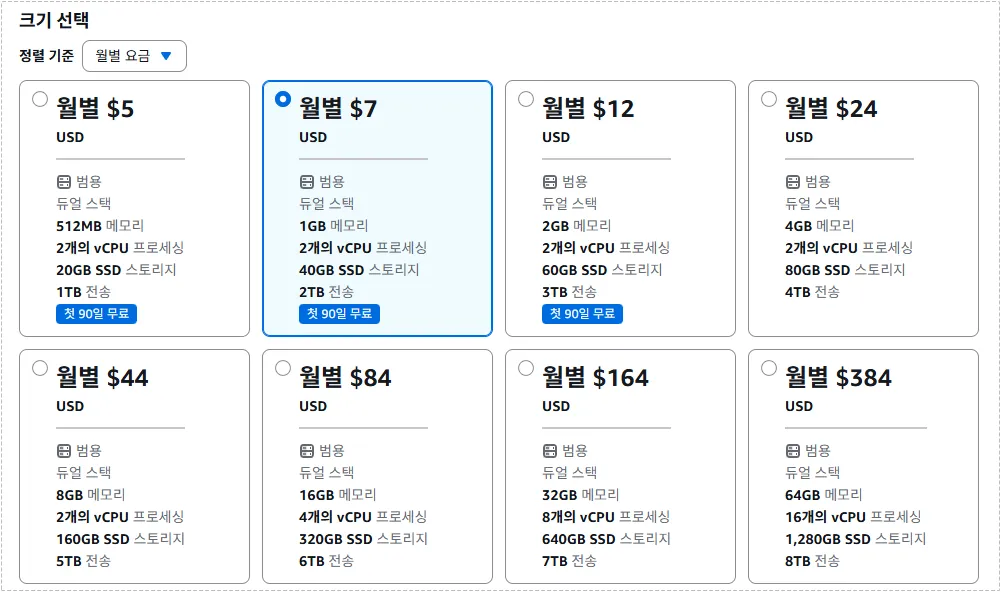
If the goal is learning or testing, a small VPS can run OpenLiteSpeed without major issues.
Recommended testing environment:
| Component | Minimum |
|---|---|
| CPU | 1 Core |
| RAM | 1 GB |
| Storage | 20 GB SSD |
| OS | Ubuntu 22.04 |
This configuration is sufficient for experimentation but not ideal for production websites.
Recommended OpenLiteSpeed Server Requirements for WordPress
For most WordPress sites, I recommend sizing the server according to actual traffic rather than simply meeting the minimum requirements.
| Daily Visitors | CPU | RAM | Storage |
|---|---|---|---|
| Up to 500 | 1–2 Cores | 2 GB | 20 GB SSD |
| 1,000–3,000 | 2 Cores | 4 GB | 40 GB SSD |
| 10,000+ | 4 Cores | 8 GB+ | NVMe Preferred |
One lesson I learned is that RAM often becomes more important than CPU in WordPress environments.
When memory runs low, lsphp workers can become constrained, causing slower page generation and increased server load.
Common Reasons for High Resource Usage
Several issues can make server performance appear worse than it actually is.
Typical causes include:
- Excessive lsphp processes
- Aggressive security plugins
- Cache misses
- Search engine bots
- Automated crawlers
- Misconfigured WordPress plugins
Even when OpenLiteSpeed Server Requirements are technically sufficient, poor caching behavior can still drive CPU usage significantly higher.
Can a CDN Reduce OpenLiteSpeed Server Requirements?
This question comes up frequently.
A CDN can reduce the delivery load for static assets such as:
- Images
- CSS files
- JavaScript files
However, dynamic requests still reach the origin server.
Examples include:
- WordPress admin pages
- Login requests
- Comments
- WooCommerce actions
Because of this, a CDN helps reduce bandwidth and static file delivery, but it does not eliminate the need for proper OpenLiteSpeed Server Requirements.
Recommended Setup for 2026
For a modern WordPress site running LiteSpeed Cache and a CDN, I generally consider the following configuration a safe starting point:
- CPU: 2–4 Cores
- RAM: 4 GB or higher
- Storage: 40 GB SSD or larger
- PHP 8.2+
- LiteSpeed Cache enabled
Sites expecting steady growth should seriously consider starting with 4 GB RAM instead of 2 GB.
The additional memory often provides far more stability than many administrators expect.
Changes After Upgrading Resources
After increasing server resources and improving cache behavior, several improvements became noticeable:
- CPU spikes became less frequent
- WordPress admin pages responded faster
- Plugin updates completed more smoothly
- Cache generation stabilized
- Page delivery became more consistent
- Traffic spikes caused fewer slowdowns
The improvement was significant enough that I stopped chasing nonexistent configuration problems and focused more on content and optimization.
FAQ
Is 2 GB RAM enough for OpenLiteSpeed?
For small blogs, yes. For growing sites, 4 GB generally provides a much more stable experience.
Is CPU more important than RAM?
For many WordPress deployments, RAM becomes the first bottleneck before CPU.
Does a CDN eliminate the need for server upgrades?
No. A CDN helps with static files, but PHP processing still occurs on the origin server.
When should I upgrade first?
In most cases:
RAM
CPU
Faster storage (NVMe)